StoreGround floorG06 · Personal project
Which streets earn a flagship?
A busy street isn't automatically a flagship street: the people walking past have to be the kind who stop. I took two years of hourly counts from Melbourne's public pedestrian sensors, sorted 78 street locations into the store size each one can carry, and tested every one against store economics you can change.
It opens on Tableau Public, which may set its own cookies. On a phone you get the phone layout.
How to read it
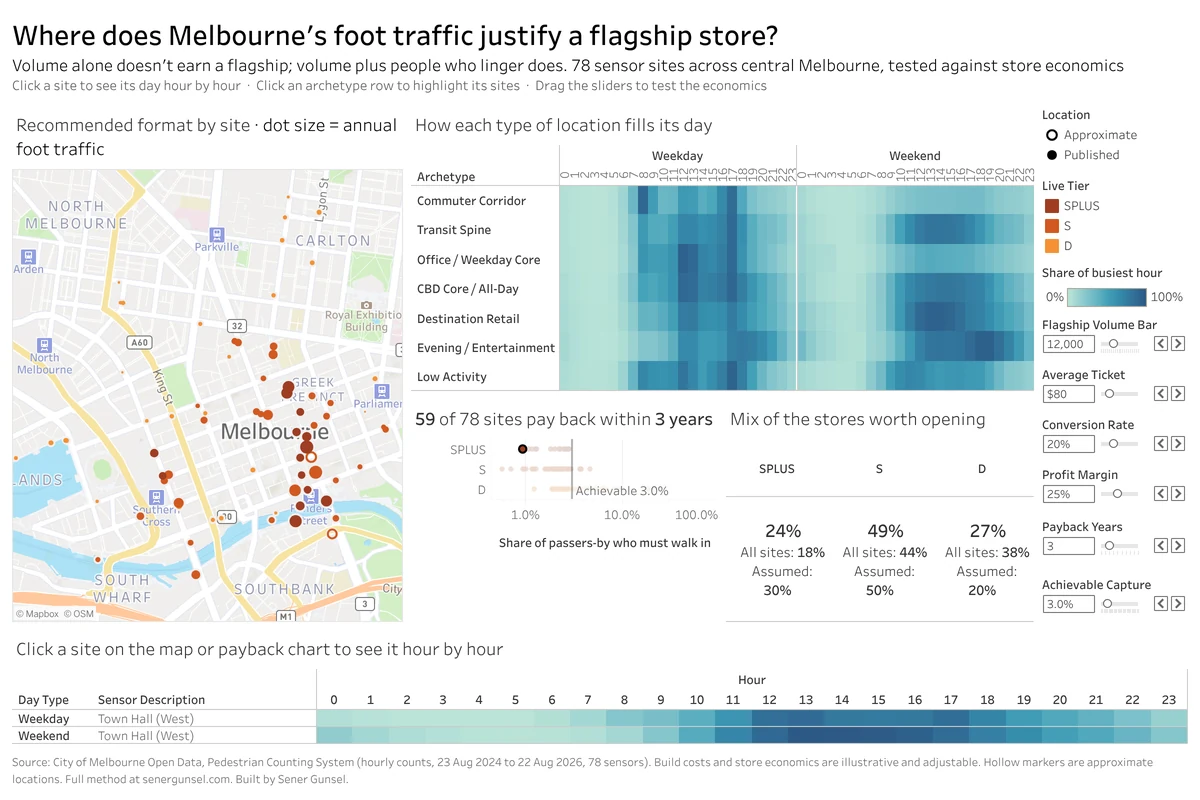
Start with the map. Every dot is a street sensor, shaded by the store size its location earns (SPLUS for a flagship, S for a standard store, D for a small one) and sized by how many people walk past in a year. Click one and the strip along the bottom shows its day hour by hour, weekdays against weekends.
Next to the map is the idea the whole dashboard rests on: seven kinds of street, each with its own daily rhythm. Commuter corridors spike at 8am and 5pm. Destination streets fill up through the afternoon and get busier at the weekend. Click a row to light up those streets on the map.
Underneath, every location takes a payback test: the share of people walking past who would have to come in for the store to earn back its build cost in three years. Anything left of the 3% line passes. The sliders change the traffic a flagship needs, the average spend, how many visitors buy, the margin, the payback period and the share you think you can win, and the store sizes and the mix move with them.
Busy isn't enough
A commuter corridor can be one of the busiest streets in the city and still be the wrong place for a flagship: the people on it are on their way somewhere, on a schedule. A flagship needs people who come to browse, eat, meet and wander. So every location gets two labels instead of one.
The first is its kind of street, set by rules on when and how people move. The rule doing the most work is direction. On a commuter route the morning crowd walks one way and the evening crowd walks back; on a destination street the flow stays balanced all day. How weekends compare with weekdays, and how much of the day comes after 6pm, do the rest.
The second is its traffic: at least 12,000 people on an average weekday for a flagship, 5,000 for a standard store, and a small store below that.
The kind of street sets the ceiling and the traffic sets the level under it. Only destination streets, the all-day city core and evening strips can reach flagship. Commuter corridors, transit spines and office streets top out at a standard store however busy they get, and the quietest streets stay small. At the default settings that makes 14 flagship locations, 34 standard and 30 small.
| Kind of street | How it's spotted | Sites | Biggest store |
|---|---|---|---|
| Low Activity | Fewer than 2,000 people on an average weekday | 6 | Small |
| Commuter Corridor | Morning and evening crowds walk opposite ways, and weekends drop below 85% of weekdays | 11 | Standard |
| Evening / Entertainment | 34% or more of weekday traffic comes after 6pm | 8 | Flagship |
| Destination Retail | Weekends at least 10% busier than weekdays, with balanced flow | 17 | Flagship |
| Office / Weekday Core | Weekends below 85% of weekdays, without the commuter swing | 9 | Standard |
| Transit Spine | Busy all week, but one-way at the peaks | 11 | Standard |
| CBD Core / All-Day | Busy all week, in both directions | 16 | Flagship |
I wrote rules instead of letting a clustering algorithm group the streets, on purpose. You can disagree with a threshold and change it. You can't argue with a cluster centre.
Where the data comes from
The City of Melbourne publishes hourly counts from pedestrian sensors across its city centre, which makes it one of the few places where a question like this can be tested on open data. I used two years of it, 23 August 2024 to 22 August 2026: 1.6 million hourly counts from 103 sensors, cleaned in Python.
When a sensor goes down its hours go missing rather than reading zero, so I measured how complete each sensor was and kept the 78 that reported at least 90% of their hours and were running from the start. Three of them send counts but are missing from the city's location file. I recovered their names from the city's 2009 to 2022 archive and placed them by landmark. They're the hollow dots on the map.
Build costs and store economics are illustrative placeholders, not Under Armour's figures, and most of them sit on the sliders so you can put in your own.
What it changes in the model
My store rollout model in Excel assumed an illustrative mix of 30% flagships, 50% standard stores and 20% small ones. The streets disagree. Of the locations that pay back at the default settings, 24% are flagship, 49% standard and 27% small: fewer flagships and more small stores than the model assumed.
Every flagship location passes the payback test at the defaults. The 19 that fail are all standard or small stores on quieter streets.
That mix is the output that matters. It replaces the hard-coded weights in the Excel model, which is what Same store, two streets is built on.
What's next
The Excel rollout model itself, anonymized, with these weights plugged in. Then the Python prep goes up on GitHub, with the full rule set and every data decision.